PowerCenter 10.5 End of Support: What It Means for Your Address Verification
 Firstlogic Team
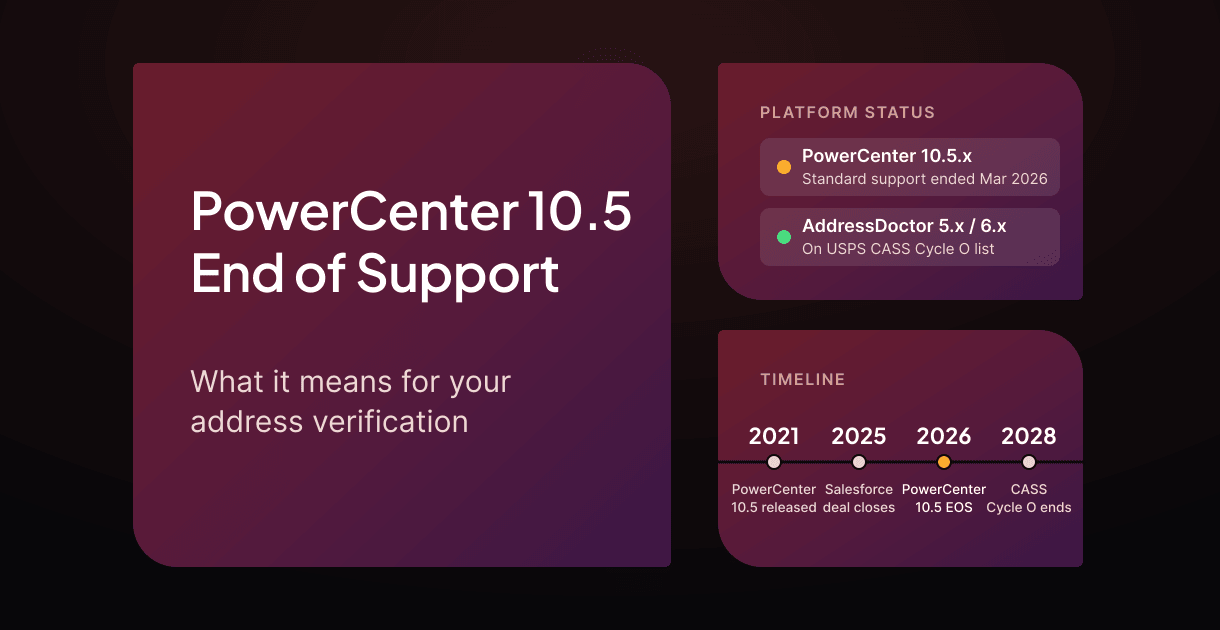
Informatica PowerCenter 10.5.x reached end of support on March 31, 2026. Informatica says so on its PowerCenter modernization page, which points customers toward its cloud platform, Intelligent Data Management Cloud (IDMC).
For many teams, PowerCenter does more than move data. It also cleanses it. If your mappings verify addresses with the Address Validator transformation, then AddressDoctor (now called Informatica Address Verification) is part of your migration too, whether you planned for it or not.
This article covers what end of support means, your options, and how to handle address verification along the way.
What has happened
Here is what we could confirm from published sources, as of November 2026.
- PowerCenter 10.5.x reached end of support on March 31, 2026. Informatica's PowerCenter modernization page states the date and refers customers to its Product Lifecycle Guide for details. That guide requires a customer login.
- Informatica now belongs to Salesforce. Salesforce completed the acquisition on November 18, 2025. It plans to integrate Informatica's data integration, quality, and governance technology into Agentforce and Data 360.
- AddressDoctor itself is still CASS certified. The USPS CASS Cycle O list published October 29, 2026 includes AddressDoctor, listed as Informatica Address Validation, versions 05.16.03 and 06.04.00. Cycle O certification runs through July 31, 2028. We found no published end-of-life date for the engine.
So the change is in the platform around AddressDoctor, not the engine. But for teams that only reach AddressDoctor through PowerCenter, the effect is much the same.
What end of support means
End of support does not switch PowerCenter off, and many teams are still running 10.5 today. But without standard support, it generally means:
- No new fixes or security patches. Problems and security vulnerabilities found from now on may not be fixed for 10.5.
- Less help when things break. Support for production issues is limited to whatever your contract still covers.
- Growing platform risk. New operating systems, databases, and security requirements will not be certified against 10.5.
Migration guides that cite Informatica's Product Lifecycle Guide report paid extended support for 10.5 through March 31, 2027, followed by sustaining support through 2029, under which even critical fixes are not guaranteed. The guide requires a customer login, so confirm the terms with Informatica. Extended support buys time, but it does not change the destination.
Your options
You have four main paths:
- Stay on 10.5 for now. Use extended support, if available to you, while you plan, but keep its end date in mind. This is the lowest effort today and the highest risk later.
- Move to Informatica's cloud platform (IDMC). This is Informatica's recommended path. Informatica also offers PowerCenter Cloud Edition, which connects your existing PowerCenter environment to IDMC so you can modernize in stages. Either way, you stay with one vendor, but change how you deploy, license, and pay. IDMC is priced in Informatica Processing Units (IPUs), a consumption-based model, so high-volume jobs need a careful cost estimate.
- Move to another integration platform. Many vendors now offer PowerCenter migration tools. You rebuild mappings on a new platform, and you need a new answer for address verification.
- Separate address verification from the integration platform. Run address verification as its own service that any pipeline can call. You can make this move first, while still on PowerCenter, and it carries over to whatever integration platform you choose next.
Why address verification deserves its own plan
Address verification is easy to overlook in a PowerCenter migration. It is often a single transformation in a mapping. But it has requirements the rest of your pipeline does not:
- Postal certification. If you mail at USPS automation prices, your address software must be CASS certified, and you need its CASS Summary Report (PS Form 3553) for each qualifying mailing. See What Is CASS-Certified Software?
- Reference data. Address verification depends on monthly postal directories. Your new setup needs a reliable way to keep them current.
- Output codes. Downstream systems read specific fields, status codes, and DPV results. A new engine needs a field-by-field mapping.
- Volume and cost. Address verification often runs across millions of records. Per-record or consumption pricing can turn a routine cleanse into a large bill.
- Data location. Customer addresses are personal data. Some organizations cannot send them to a cloud service at all.
Planning address verification separately lets you make these decisions on their own merits, instead of accepting whatever your new integration platform includes. The same goes for matching and de-duplication jobs that run inside PowerCenter.
A migration checklist for address verification
Use this checklist to plan the address verification part of your PowerCenter migration. Tick items off as you go.
A few tips:
- Start with an inventory. Address verification is often called from more places than anyone remembers: old mappings, MDM jobs, and custom code.
- Test on your own data. Use a sample of at least several thousand real records, including the messy ones. Compare match rates, then review the records the engines disagree on.
- Run old and new in parallel. Keep both running for at least one full mailing cycle before you switch over.
Where Firstlogic fits
Firstlogic Address Verification, built on the Address IQ engine, does not depend on any one integration platform:
- USPS CASS and Canada Post SERP certified. Address IQ is on the current CASS Cycle O list and is SERP certified for Canadian addresses.
- Runs in your environment. Run it on-premises, in an air-gapped network, or in your private cloud on AWS, Azure, or GCP, on Windows or Linux or in a Docker container. Your address data never leaves your network.
- Works with any pipeline. Call it from batch jobs, through the self-hosted AIQ Realtime Services REST API, or with the Address IQ SDK for Java, .NET, and C++. That means it works with PowerCenter today and with whatever replaces it.
- Predictable pricing. An annual license includes unlimited records, with no per-lookup fees.
- More than addresses. Add NCOALink moves, geocoding, data standardization, and matching from Firstlogic Data Quality as you need them.
Planning your PowerCenter migration? Contact us to talk through the address verification part and set up a test on your own data.
Facts in this article were checked on November 3, 2026.
Frequently asked questions
When did PowerCenter 10.5 reach end of support?
Can I keep running PowerCenter 10.5 after end of support?
Does PowerCenter end of support affect AddressDoctor?
Is AddressDoctor end of life?
Do I have to move address verification to the cloud when I leave PowerCenter?

Enhanced Address Cleansing: More Than Standardization and ZIP+4